Got a New iPhone 17? Here’s How to Use Its Key New Features

Share via:

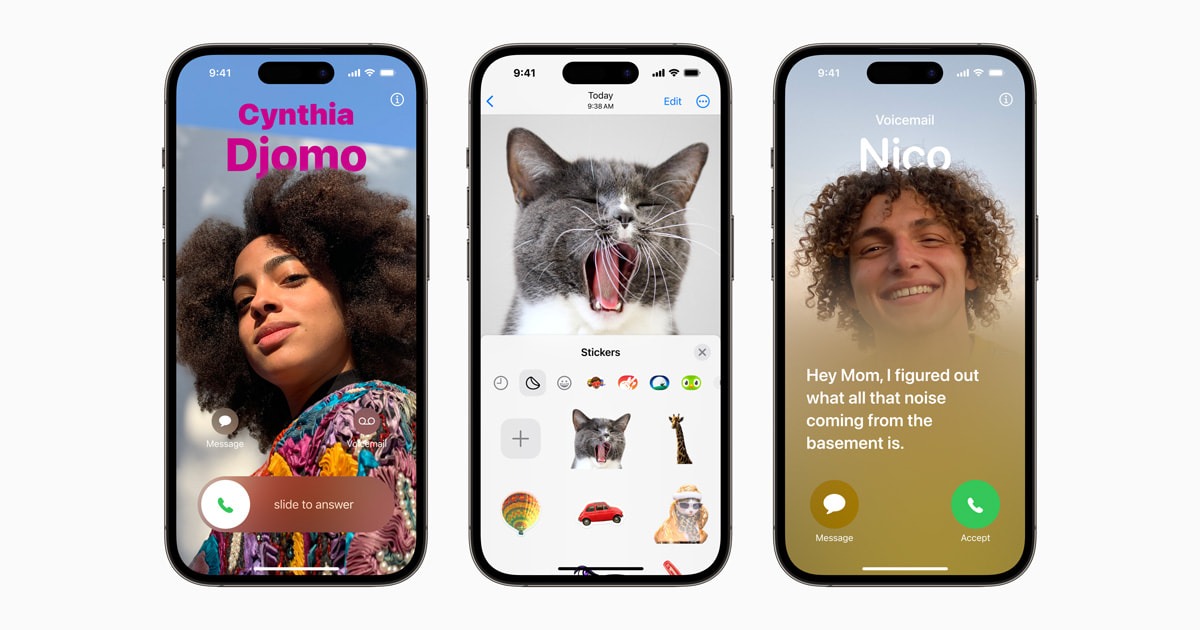
If you’ve just upgraded to the iPhone 17, you’ll notice several changes that go beyond hardware. Apple has paired the device with new iOS features designed to improve everyday interactions, simplify settings, and enhance how users customize their phones. Understanding these updates helps unlock the full value of the device.

Updated Design and System Experience

Refined Interface and Controls

  • Apple has adjusted system animations for smoother transitions.
  • Menus and controls feel more responsive, especially during multitasking.
  • Touch responsiveness has been improved for quicker interactions.

Customizable Control Center

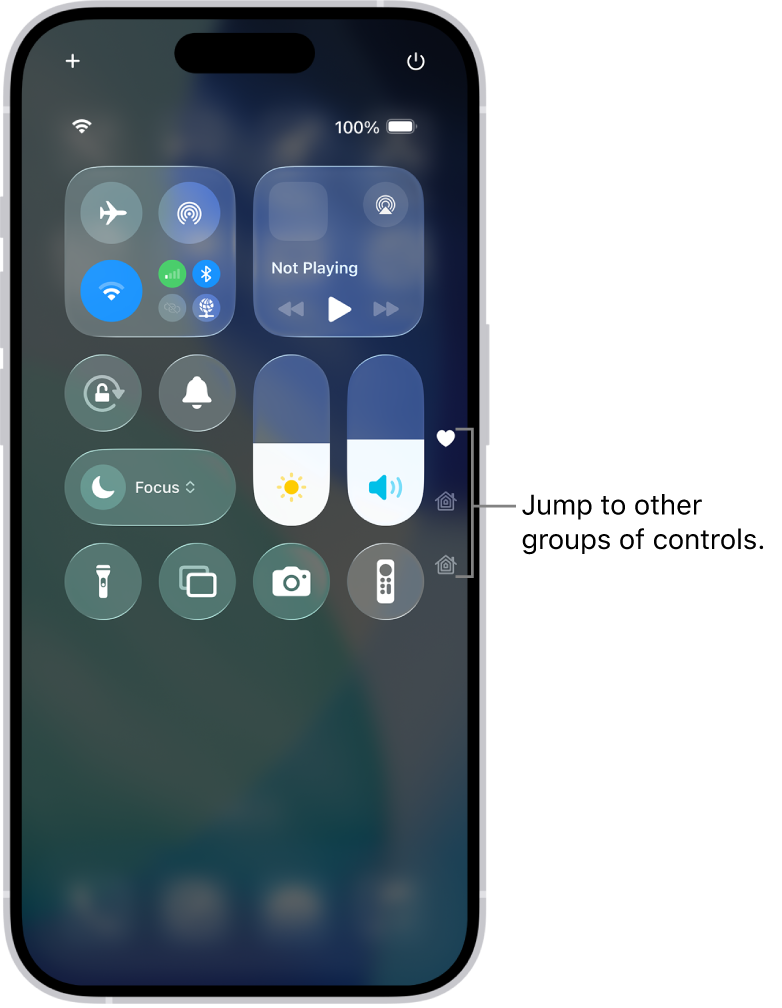
  • The Control Center now offers deeper customization.
  • Users can add, remove, or rearrange controls more freely.
  • Frequently used settings are easier to access with fewer swipes.

Smarter iOS Features

Enhanced Widgets and Home Screen

  • Widgets support more real-time information.
  • Home Screen layouts allow greater personalization.
  • App icons and widgets adapt better to light and dark modes.

Improved Notifications and Focus

  • Notifications are more intelligently grouped.
  • Focus modes provide finer control over alerts and app access.
  • Users can create custom Focus profiles for work, sleep, or travel.

Camera and Media Enhancements

Updated Camera Interface

  • The camera app features a cleaner layout.
  • Common shooting modes are easier to reach.
  • On-screen guidance helps users capture better photos and videos.

Media Playback and Sharing

  • Video playback is smoother with improved system optimization.
  • Sharing photos and videos across apps is faster and more consistent.
Performance and Battery Optimizations

System Efficiency

  • Background processes are better managed to reduce power usage.
  • Apps launch faster due to improved memory handling.

Battery Management

  • New battery health tools provide clearer usage insights.
  • Charging optimization helps extend long-term battery lifespan.

Conclusion

The iPhone 17 builds on Apple’s focus on refinement rather than radical change. With smarter iOS features, improved customization, and performance enhancements, the device offers a more polished daily experience. Exploring these tools early ensures users get the most out of their new iPhone.


Disclaimer

We strive to uphold the highest ethical standards in all of our reporting and coverage. We StartupNews.fyi want to be transparent with our readers about any potential conflicts of interest that may arise in our work. It’s possible that some of the investors we feature may have connections to other businesses, including competitors or companies we write about. However, we want to assure our readers that this will not have any impact on the integrity or impartiality of our reporting. We are committed to delivering accurate, unbiased news and information to our audience, and we will continue to uphold our ethics and principles in all of our work. Thank you for your trust and support.

Popular

More Like this

Got a New iPhone 17? Here’s How to Use Its Key New Features

If you’ve just upgraded to the iPhone 17, you’ll notice several changes that go beyond hardware. Apple has paired the device with new iOS features designed to improve everyday interactions, simplify settings, and enhance how users customize their phones. Understanding these updates helps unlock the full value of the device.

Updated Design and System Experience

Refined Interface and Controls

  • Apple has adjusted system animations for smoother transitions.
  • Menus and controls feel more responsive, especially during multitasking.
  • Touch responsiveness has been improved for quicker interactions.

Customizable Control Center

  • The Control Center now offers deeper customization.
  • Users can add, remove, or rearrange controls more freely.
  • Frequently used settings are easier to access with fewer swipes.

Smarter iOS Features

Enhanced Widgets and Home Screen

  • Widgets support more real-time information.
  • Home Screen layouts allow greater personalization.
  • App icons and widgets adapt better to light and dark modes.

Improved Notifications and Focus

  • Notifications are more intelligently grouped.
  • Focus modes provide finer control over alerts and app access.
  • Users can create custom Focus profiles for work, sleep, or travel.

Camera and Media Enhancements

Updated Camera Interface

  • The camera app features a cleaner layout.
  • Common shooting modes are easier to reach.
  • On-screen guidance helps users capture better photos and videos.

Media Playback and Sharing

  • Video playback is smoother with improved system optimization.
  • Sharing photos and videos across apps is faster and more consistent.

Performance and Battery Optimizations

System Efficiency

  • Background processes are better managed to reduce power usage.
  • Apps launch faster due to improved memory handling.

Battery Management

  • New battery health tools provide clearer usage insights.
  • Charging optimization helps extend long-term battery lifespan.

Conclusion

The iPhone 17 builds on Apple’s focus on refinement rather than radical change. With smarter iOS features, improved customization, and performance enhancements, the device offers a more polished daily experience. Exploring these tools early ensures users get the most out of their new iPhone.

Disclaimer

We strive to uphold the highest ethical standards in all of our reporting and coverage. We StartupNews.fyi want to be transparent with our readers about any potential conflicts of interest that may arise in our work. It’s possible that some of the investors we feature may have connections to other businesses, including competitors or companies we write about. However, we want to assure our readers that this will not have any impact on the integrity or impartiality of our reporting. We are committed to delivering accurate, unbiased news and information to our audience, and we will continue to uphold our ethics and principles in all of our work. Thank you for your trust and support.

Website Upgradation is going on for any glitch kindly connect at office@startupnews.fyi

More like this

Apple @ Work: Dashlane’ Passkey Power Report shows why...

Apple @ Work is exclusively brought to you...

5 Key Trends Shaping Agentic Development in 2026

So far in my review of agentic development...

NY Governor Hochul signs bill requiring warning labels on...

New York Governor Kathy Hochul signed a bill...

Popular