
Microsoft has officially begun rolling out Windows 11 Update KB5074109, marking one of the most important updates of early 2026 for both consumers and enterprise users. The update delivers a wide range of critical security patches, alongside major bug fixes impacting Azure Virtual Desktop (AVD) environments and PC gaming performance. According to detailed reporting by TechNetBooks, KB5074109 addresses vulnerabilities that could be actively exploited while also resolving long-standing issues that affected stability, performance, and user experience.
Unlike routine cumulative updates, KB5074109 stands out due to its scope. It reflects Microsoft’s ongoing effort to stabilize Windows 11 as the operating system evolves to support AI-driven workloads, cloud desktops, and increasingly demanding gaming scenarios.
Why KB5074109 Is a High-Priority Windows 11 Update
KB5074109 is part of Microsoft’s January 2026 Patch Tuesday cycle, a release window traditionally reserved for high-impact fixes. This update targets vulnerabilities that could allow attackers to elevate privileges, execute malicious code, or bypass security protections under certain conditions.
Microsoft has emphasized that timely installation is strongly recommended, particularly for systems connected to enterprise networks or used for online gaming. As Windows 11 adoption continues to grow across consumer and professional environments, the attack surface expands, making comprehensive patching essential.
Critical Security Fixes at the Core of the Update
Security remains the centerpiece of KB5074109. The update patches multiple vulnerabilities across Windows core components, including areas responsible for memory handling, authentication, and system services.
While Microsoft has not publicly detailed every vulnerability for security reasons, the update documentation confirms that several issues were rated high severity. These flaws could potentially be exploited without user interaction, making them particularly dangerous in unmanaged environments.
By addressing these vulnerabilities early in 2026, Microsoft reinforces its message that Windows 11 security is an ongoing process rather than a one-time milestone.
Major Improvements for Azure Virtual Desktop (AVD)
One of the most significant aspects of KB5074109 is its impact on Azure Virtual Desktop, Microsoft’s cloud-based virtualization platform used by enterprises and hybrid workforces.
Before this update, administrators reported intermittent session instability, unexpected disconnects, and performance degradation in certain AVD configurations. KB5074109 includes fixes designed to improve session reliability, resource allocation, and overall responsiveness.
For organizations relying on virtual desktops for remote work, these improvements are more than cosmetic. They directly affect productivity, user satisfaction, and support overhead.
Why AVD Fixes Matter More Than Ever
AVD has become a critical component of modern enterprise infrastructure. As hybrid and remote work models mature, organizations increasingly depend on cloud-hosted desktops rather than traditional local machines.
Issues affecting AVD environments can scale quickly, impacting hundreds or thousands of users simultaneously. KB5074109’s targeted fixes demonstrate Microsoft’s recognition of this dependency and its commitment to maintaining AVD as a stable, enterprise-ready platform.
The update also aligns with Microsoft’s broader push toward cloud-first computing experiences.
Gaming Bug Fixes Address Longstanding Player Complaints
Beyond enterprise environments, KB5074109 delivers welcome news for gamers. The update resolves several Windows 11 gaming-related bugs that previously caused performance drops, stuttering, or inconsistent frame pacing in certain titles.
Gamers had reported that specific system-level processes introduced latency during gameplay, particularly on high-refresh-rate displays. KB5074109 addresses these issues by refining how Windows 11 prioritizes gaming workloads.
For competitive players and enthusiasts, these fixes can translate directly into smoother gameplay and more consistent performance.
Balancing Gaming Performance and System Security
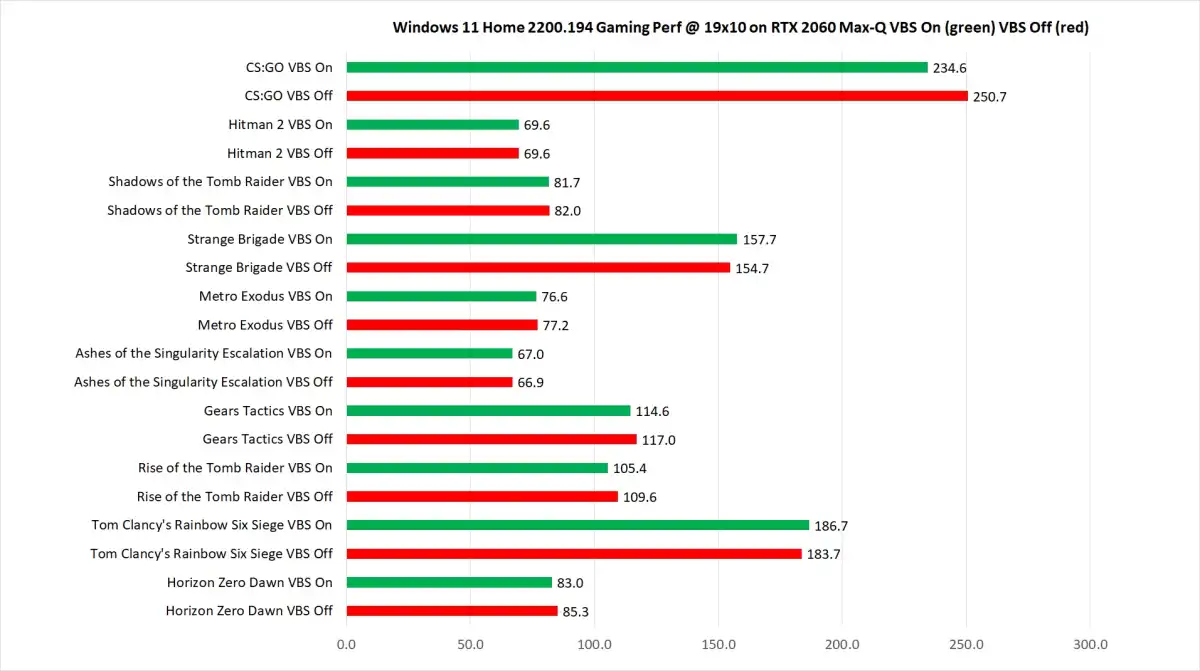
One challenge Microsoft faces is balancing security enhancements with performance demands. Security patches often add checks and safeguards that can inadvertently impact system responsiveness.
KB5074109 demonstrates a more refined approach. Rather than introducing broad restrictions, Microsoft has optimized underlying processes to minimize overhead. This ensures that security improvements do not come at the expense of gaming performance.
This balance is crucial as Windows 11 positions itself as the preferred platform for both productivity and entertainment.
Stability and Reliability Enhancements Across Windows 11
In addition to headline fixes, KB5074109 includes a range of stability improvements that address less visible but equally important issues. These fixes target system crashes, memory leaks, and inconsistencies that could surface during prolonged use.
While such improvements may not be immediately noticeable, they contribute to a smoother long-term experience. Over time, cumulative stability fixes reduce system fatigue and improve reliability.
This approach reflects Microsoft’s ongoing effort to mature Windows 11 beyond its initial launch phase.
Implications for AI-Enabled and Modern PCs
As Windows 11 increasingly supports AI-driven features and hardware equipped with NPUs, updates like KB5074109 play a foundational role. Security and stability fixes ensure that newer hardware capabilities operate within a safe and predictable environment.
Although KB5074109 is not an AI-focused update, its underlying improvements help prepare Windows 11 for more advanced workloads later in 2026.
This groundwork is essential as Microsoft expands its AI-first vision for Windows.
Enterprise Impact and IT Administrator Considerations
For IT administrators, KB5074109 represents a must-deploy update. The combination of security patches and AVD fixes makes it particularly relevant for managed environments.
Administrators are encouraged to test the update in staging environments before broad deployment, especially in organizations with complex virtualization setups. However, delaying installation for too long could expose systems to known vulnerabilities.
Microsoft’s documentation emphasizes compatibility and minimal disruption, but caution remains standard practice in enterprise IT.
Consumer Experience: What Users Should Expect
For everyday users, the update process should feel routine. KB5074109 installs as a cumulative update through Windows Update, requiring a system restart.
After installation, users may notice improved responsiveness, fewer random slowdowns, and more stable gaming sessions. Security enhancements, while largely invisible, provide essential protection in the background.
Microsoft continues to recommend automatic updates as the best way to stay protected.
How KB5074109 Fits Into Microsoft’s 2026 Roadmap
The January 2026 update sets the tone for Microsoft’s Windows strategy this year. Rather than focusing on flashy new features, Microsoft is prioritizing security, reliability, and performance refinement.
This approach suggests that Windows 11 is entering a phase of consolidation, where the focus shifts from rapid feature expansion to strengthening the foundation.
Such periods are critical for long-term platform health.
Why Prompt Installation Matters
Cybersecurity threats evolve rapidly, and delayed updates increase risk exposure. KB5074109 addresses vulnerabilities that attackers could exploit if left unpatched.
For gamers, enterprises, and everyday users alike, installing the update promptly reduces the chance of compromise while delivering tangible performance benefits.
Microsoft’s emphasis on early 2026 security reinforces the importance of proactive maintenance.
Community and Industry Response
Early feedback from IT professionals and gamers has been cautiously positive. Reports indicate improved stability in AVD sessions and fewer gaming-related performance anomalies.
As with any large update, broader adoption will reveal edge cases, but initial impressions suggest that KB5074109 achieves its primary goals without introducing major regressions.
Industry observers view the update as a solid step forward rather than a risky overhaul.
What to Watch After Installing the Update
Users are encouraged to monitor system behavior after installation. While KB5074109 is designed to be stable, reporting issues through official channels helps Microsoft refine future updates.
Gamers should test previously problematic titles, and enterprise users should verify AVD session performance under typical workloads.
Feedback loops remain a critical part of Windows’ evolution.
Conclusion: A Strong Start for Windows 11 in 2026
Windows 11 Update KB5074109 represents a strong and necessary start to 2026 for Microsoft’s operating system. By addressing critical security vulnerabilities, resolving major AVD issues, and improving gaming performance, Microsoft demonstrates a clear focus on reliability and user trust.
Rather than introducing disruptive changes, KB5074109 strengthens the platform’s core. This approach benefits both consumers and enterprises, ensuring that Windows 11 remains secure, stable, and capable as new technologies emerge.
For users wondering whether to install the update, the answer is clear. KB5074109 is not just recommended—it is essential for maintaining a secure and optimized Windows 11 experience.


