Top AI Animation Tools for Indie Game Developers: 9 Best Platforms Compared

Share via:

You’re racing a deadline, fingers still sticky with code, while the trailer storyboard on your second monitor refuses to move. Animation drains time, money, and skills most small teams simply lack. Good news: generative AI is closing that gap. One recent survey found that about one-third of game developers already lean on these tools to speed production. In the pages ahead, we’ll show you which nine platforms earn a spot in your workflow, why they matter, and where the pitfalls hide—so your game can start moving today.

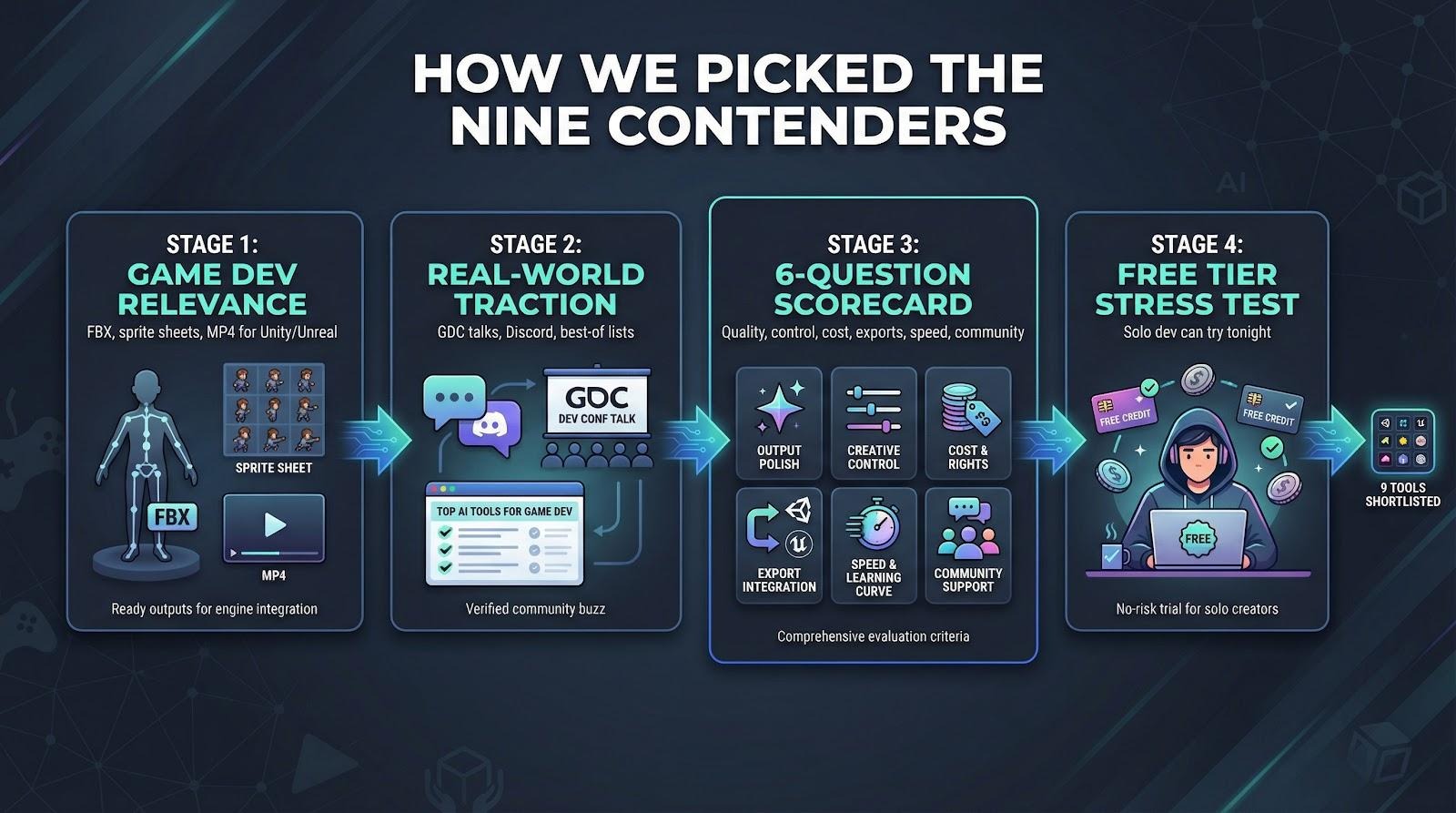
How we picked the nine contenders

We didn’t grab random buzzwords off Twitter. We began with one test: Will this tool genuinely shorten an indie team’s road from idea to on-screen motion?

First, we filtered for relevance to game development. If a product couldn’t spit out FBX skeletons, sprite sheets, or at least MP4 clips you can drop into Unity, it was gone.

Next, we checked real-world traction. We combed through GDC talks, Discord threads, and “best AI for game dev” lists published between July 2024 and December 2025. When a name like Cascadeur or DeepMotion kept resurfacing, and users posted shipped-game examples, it made the cut. Hidden gems with lively beta communities earned a spot, too.

Then came our side-by-side scorecard. Every candidate faced the same six questions:

  1. How polished is the output? 
  2. How much creative control do you keep? 
  3. What does it cost, and can you ship commercially? 
  4. Do the exports slot cleanly into Unity or Unreal? 
  5. How fast is generation and how steep the learning curve? 
  6. Is there a helpful community when you hit roadblocks?

Finally, we stress-tested free tiers to prove a solo dev could try each tool tonight without pulling out a corporate credit card.

The fast-look scorecard

The table below compares each shortlisted platform on cost, export formats, and the quirk likely to trip you up.

Scan the columns, match them to your current hurdle, and jump straight to the detailed review that fits.
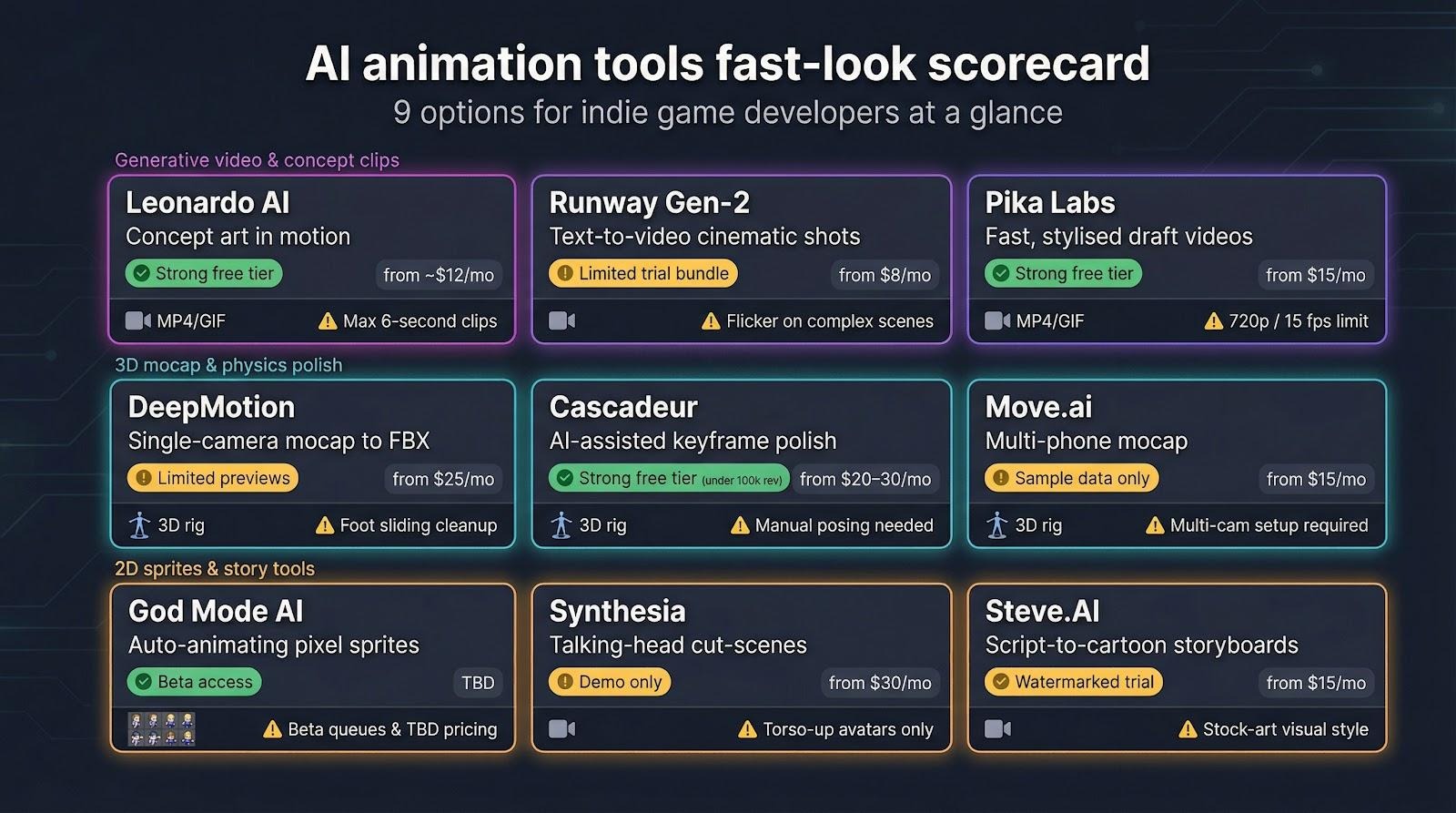
ToolShines atFree tierEntry priceExport typesBiggest catch
Leonardo AIAnimating concept art and short mood clips150 daily tokensabout $12 per monthMP4, GIFClips cap at six seconds
Runway Gen-2Text-prompted cinematic shotsCredit bundle$12 per monthMP4, frame sequenceFlicker on detailed scenes
Pika LabsFast, stylised draft videos150 credits per month$8 per monthMP4, GIF720p limit at 15 fps
DeepMotionSingle-camera mocap to FBX10-second previews$15 per monthFBX, BVHFoot sliding needs cleanup
CascadeurAI-assisted keyframe polishFull plan if revenue under $100k$25 per monthFBX, DAEManual posing still required
God Mode AIAuto-animating pixel spritesLimited beta creditsPricing TBDPNG sheets, JSONQueue waits during beta
SynthesiaTalking-head cut-scenesOne demo video$30 per monthMP4 (1080p)Torso-up avatars only
Steve.AIScript-to-cartoon storyboardsWatermarked trial$20 per monthMP4 (1080p)Stock-art look
Move.aiMulti-phone, high-fidelity mocapSample data only$30 per monthFBX, Unreal pluginNeeds multi-cam setup

Keep this chart handy. It turns a crowded market into a two-minute decision. Up next, we break down each tool to see where it truly earns its spot.

1. Leonardo AI: concept art in motion

Leonardo acts like a creative Swiss-Army knife, and its browser-based Leonardo’s creator suite folds in an AI Video Generator so you can animate concept art without ever leaving your tab. Sketch a castle at sunset, click Animate, and within seconds flags ripple, clouds drift, and the camera slides into a cinematic reveal. No extra software, no node graphs; just a browser panel with sliders for clip length and motion style.

Each clip lasts up to six seconds at 1080p, so it won’t carry a whole trailer. It is perfect B-roll for Steam pages, menu backgrounds, or mood-setting cut-scenes that would otherwise stay static.

The free tier offers plenty of tokens, commercial rights come standard, and the community shares fresh prompt recipes every day. For indies juggling art and code, Leonardo turns still images into eye-catching motion in minutes.

2. Runway Gen-2: text-to-video imagination on tap

Type a line of prose, such as “rusted mechs march through neon rain,” and Gen-2 returns a four-second clip that nails the vibe. Atmosphere is its real strength. Fog swirls, puddles shimmer, and your dark-synth soundtrack finally has visuals.

Quality lands between dreamlike art film and polished concept board. Frames can flicker and faces morph if you push detail, but for establishing shots or teaser stingers it feels almost unreal.

The credit system is straightforward: about twelve dollars buys hundreds of generations, and every export comes license-clean. Treat Gen-2 as a rapid ideation engine. Stack its clips in your editor, trim the best moments, and you can craft a moody trailer before lunch.

3. Pika Labs: rapid-fire style experiments

Pika feels like the jam-session cousin of Runway. You toss in a prompt or a single still, and it riffs back a pocket-sized video within seconds. Picture neon anime loops, synth-wave cityscapes, or painterly dream sequences that would take hours to key-frame by hand.

Speed is the main draw. Turbo mode spits out previews almost as fast as you can type. When you spot a keeper, switch to Pro mode for crisper frames and richer colour, still inside the same chat-style interface.

Output lands at 720p (1280 × 720) and about 15 frames per second, which is plenty for menu backgrounds, teaser GIFs, and in-game billboards. Frame coherence outperforms early Gen-2 builds, so characters hold their shapes even during quick pans.

The free plan supplies 150 monthly credits, enough to prototype a week of social posts. Upgrade for eight dollars and you gain more credits plus shorter queues. For indies craving a low-friction playground where bold ideas turn into moving pictures, Pika delivers a shot of creative energy.

4. DeepMotion: motion capture without a suit

Set your phone on a bookshelf, swing a foam sword in the living room, upload the clip, and five minutes later your hero swings with the same weight and timing. That is DeepMotion in action.

The cloud service reads a single-camera video, reconstructs full-body, finger, and facial movement, then returns an FBX or BVH you can drop into Unity or Unreal. Import, retarget, and press play. No markers or studio hire needed, and at $15 per month it fits a tight indie budget.
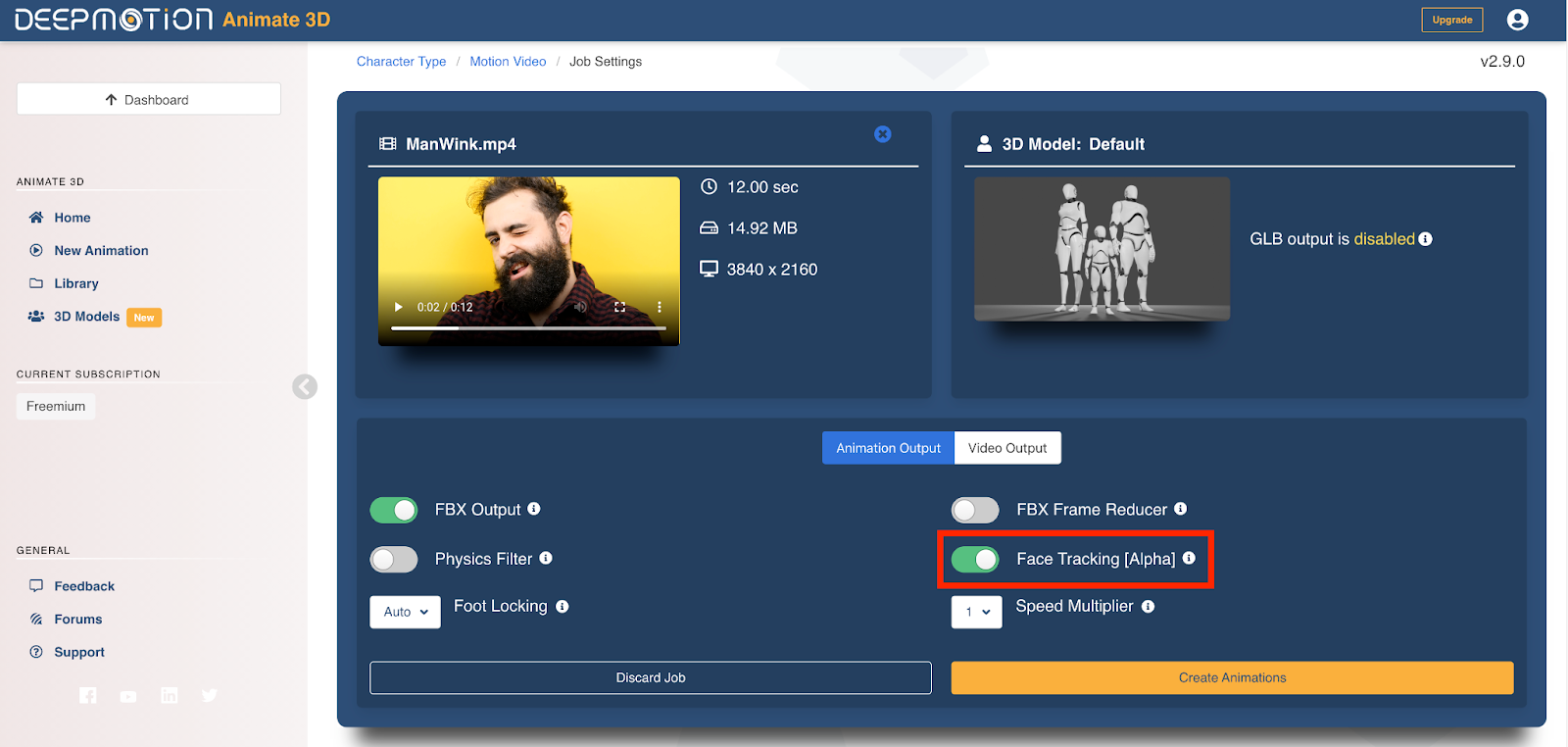
DeepMotion Cloud Motion Capture Interface for Suitless Mocap

Accuracy is not flawless; you may see a hint of foot slide or elbow jitter, but cleanup takes minutes rather than hours. For teams that need dozens of custom moves without renting a stage, DeepMotion offers the quickest path from living-room performance to in-game animation.

5. Cascadeur: physics-savvy polish for keyframe animators

Sometimes you need a backflip your body cannot record. Cascadeur fills that gap. Block two or three key poses, click Auto-Physics, and the software generates in-betweens with convincing weight and follow-through.

Its strength lies in the ghost-trajectory view. Drag a foot’s motion arc until it feels right, and the AI recalculates every frame to keep the centre of mass balanced. The result resembles studio mocap even though it began as rough keys on your laptop.

Solo devs appreciate the pricing: all features stay free until your studio earns $100,000 in revenue. You can animate an entire combat system today and pay later when sales arrive.

Animation instincts still matter, yet Cascadeur turns those instincts into AAA-level motion in far less time and saves you from “floaty jump” feedback on Steam.

6. God Mode AI: pixel art on autopilot

Top-down RPG? Roguelike shooter? Then you know the grind of drawing eight walking directions for every NPC. God Mode takes a single sprite and spits out complete sheets: idle, walk, attack, and hit flashes, all in the same retro palette.
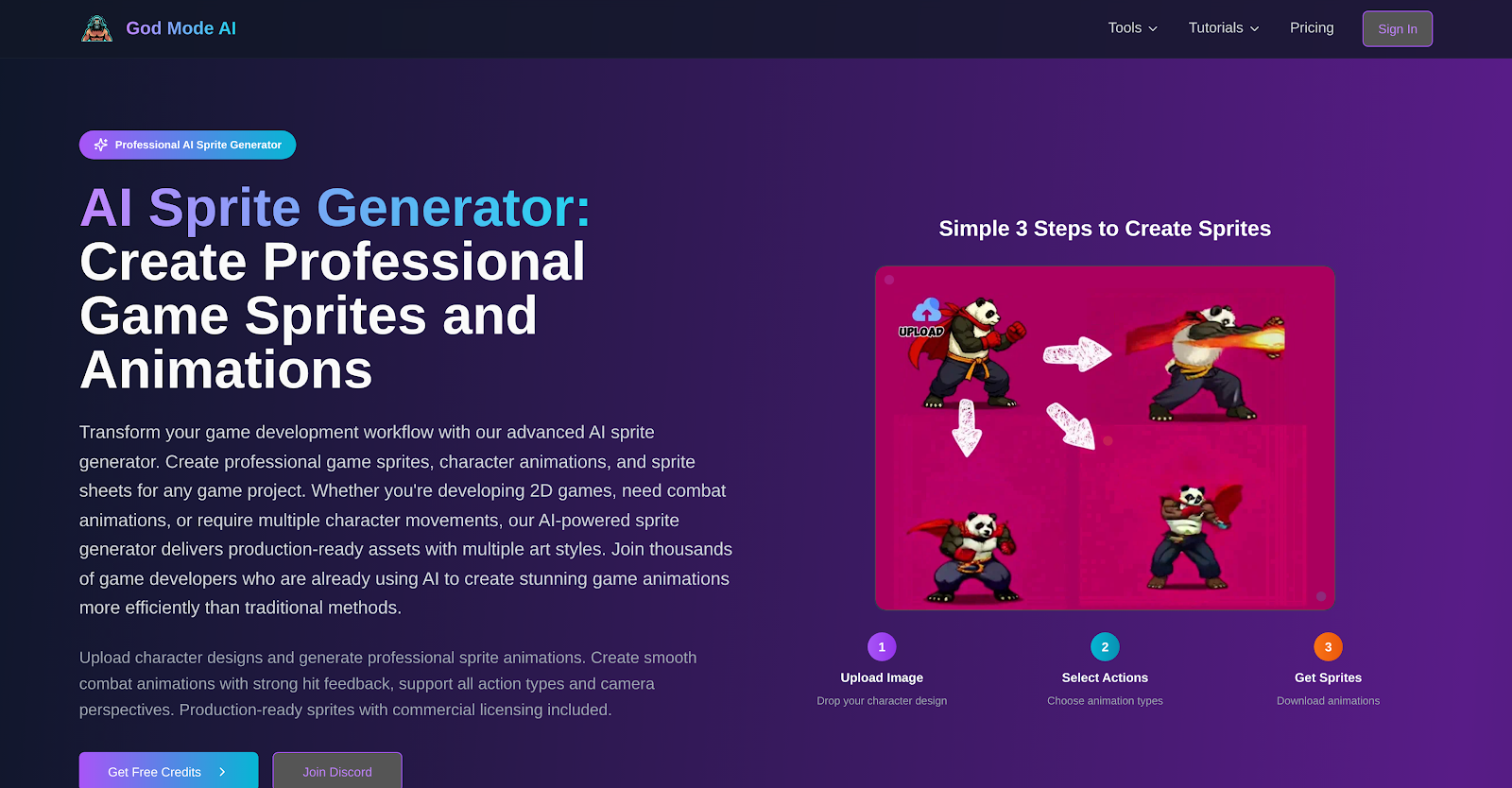
God Mode AI Pixel Art Sprite Sheet Examples for Indie Games

Choose NES, SNES, or Game Boy colour limits, upload your hero, and the bot queues a batch. About ten minutes later you receive PNG strips plus JSON data ready for Unity’s Animation system. Review, tidy a few stray pixels, and ship.

The tool remains in beta, so queues can back up during peak hours and pricing is still in flux. Early-access credits are generous, and every frame carries commercial rights. For 2D indies buried in frame-by-frame work, God Mode feels like unlocking a hidden shortcut.

7. Synthesia: talking-head cut-scenes

Need a news anchor to brief players between levels, but casting and filming crush the budget? Open Synthesia. Pick an AI presenter, paste your script, and click Render. Within seconds a host delivers lip-synced English or one of 140 other languages straight to camera.

Videos export at 1080p without a watermark on the entry plan. Drop the clip onto a TV mesh in Unity, loop it inside a dystopian hub, and most players will assume you filmed a live presenter.

Limitations are clear: avatars remain waist-up and express only subtle gestures, so use Synthesia for tutorials, broadcasts, or hologram cameos rather than emotional story beats. At $30 per month it still costs less than renting lights, microphones, and a studio for a single afternoon.

8. Steve.AI: storyboard to video in one click

You have lore to share but zero animators on staff. Drop your script into Steve.AI, select a cartoon style, and the platform assembles scenes, characters, and voice-over in minutes. It feels like a turbocharged PowerPoint, ideal for draft cut-scenes, Kickstarter pitches, or quick internal storyboards.

The visuals look stock-but-serviceable. Swap any prop or background the AI suggests, drag timing bars to tighten pacing, then export a watermark-free 1080p MP4 once you upgrade from the trial. Players will not confuse it with in-engine graphics, yet they will understand your narrative in about two minutes.

At $20 per month, Steve.AI costs less than commissioning a single illustration. Use it to pitch the vision early, then pass the polished animatic to artists later. It bridges raw text and full cinematics and can shave weeks off production.

9. Move.ai: garage-level gear, studio-quality mocap

If DeepMotion is convenient, Move.ai is ambitious. Place two to six iPhones around your room, clap to sync, and act out the scene. The cloud service analyses every angle, combines depth data, and returns an FBX that can rival optical-marker rigs.

Multi-camera capture keeps feet planted, hips rotating, and subtle shoulder shrugs intact, which is ideal for fighting games or VR titles that depend on believable impact. You can even stream takes straight into Unity for live previews.

Setup demands some effort: tripods, tape marks, and good lighting. The indie plan also limits you to a few minutes of processed footage each month. Even so, at $30 per month it still costs less than renting a mocap stage for an hour.

For teams chasing high-end motion on a tight budget, Move.ai turns a spare bedroom into a mini performance studio. Hit record, swing that foam sword, and watch your MetaHuman come to life.

Pick your loadout: matching tools to common indie hurdles

Choosing feels easier when you start from the problem, not the tech. So let’s map five classic pain points to the AI tool of choice.
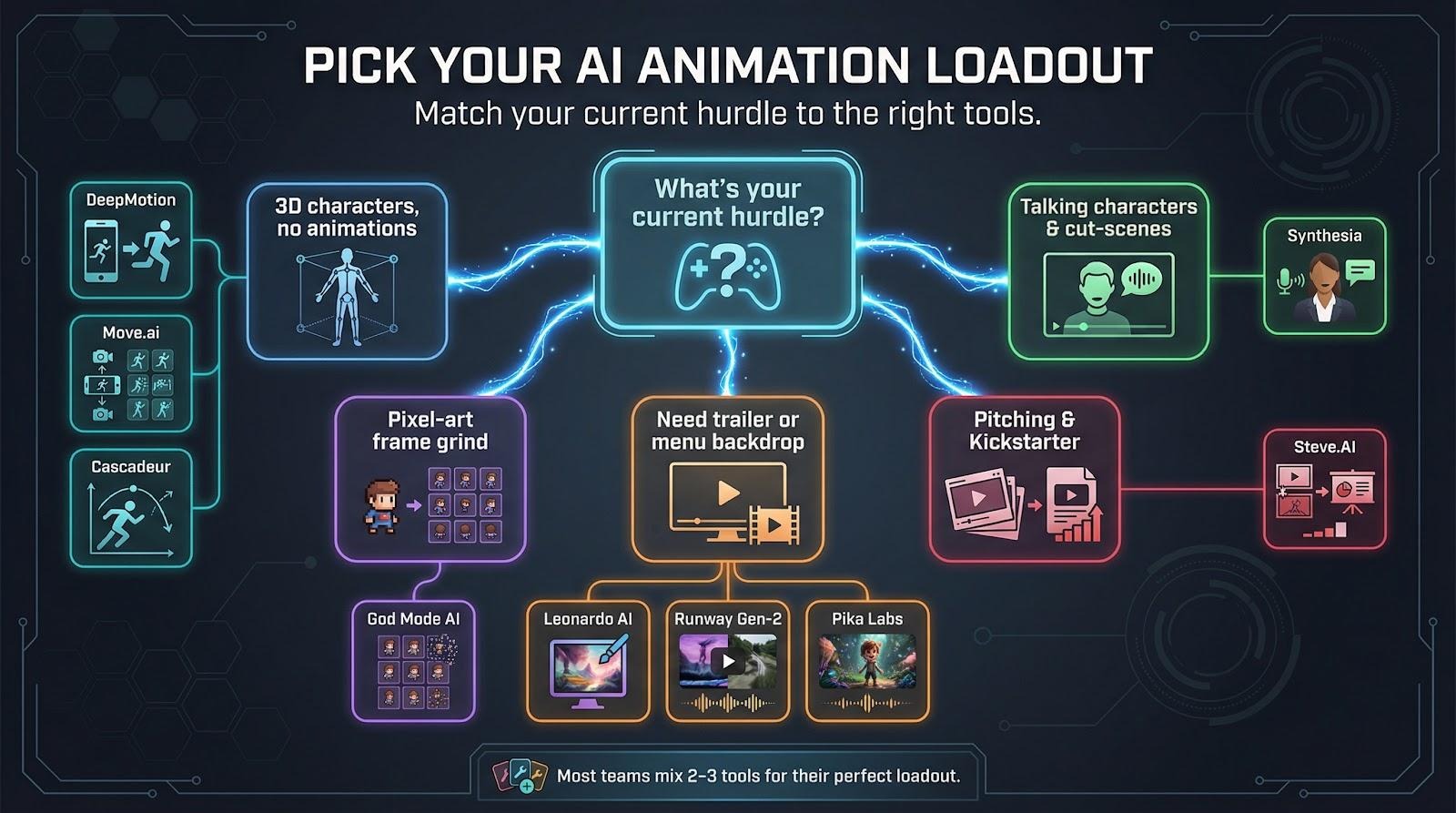
You have 3D characters gathering dust because animation is hard. Fire up DeepMotion for quick clips. When you need clean swordplay or two-actor scenes, step up to Move.ai. Cascadeur sits ready to polish or exaggerate any move you import.

You’re building a pixel-art adventure yet drowning in frame lists. God Mode turns one hero sketch into eight-direction runs and flashy VFX while you focus on level design.

You need a trailer or menu backdrop tomorrow. Leonardo animates key art you already love. No assets? Runway and Pika brainstorm full vistas from text, then hand you clips to stitch into a moody teaser.

Your story relies on characters talking to the player. Synthesia supplies convincing news anchors and AI mentors without microphones or studio lights.

You’re still pitching, not producing. Steve.AI converts that Word doc of lore into a two-minute animatic, perfect for Kickstarter or internal buy-in.

Mix and match freely. Most teams land on two or three tools: one for raw motion, one for cut-scene flair, and one for marketing scraps. Start with the free tiers tonight, test on a real task, and upgrade only when a clip makes you grin.

Five questions every indie asks about AI animation

Is the output good enough to ship?

For 3D motion, yes. DeepMotion and Move.ai hand you FBX files that drop straight into Unity with only light cleanup. For generative video, treat clips as concept art or cut-scene backdrops, not frame-by-frame story moments. Quality keeps climbing, yet right now it shines most in non-interactive assets.

Do I fully own the assets these tools create?

On paid plans the answer is effectively yes. Every platform in our lineup grants commercial rights to your outputs, provided you avoid trademarked prompts. Keep a folder of original settings and renders for each asset; that simple paper trail brings peace of mind.

Will players spot the “AI look” and complain?

Only if you let styles clash. Mocap data is invisible once retargeted, and sprite sheets feel hand-drawn after a quick polish. The uncanny valley appears mostly in photoreal AI video, so use those clips for atmospheric shots or in-game monitors, not close-ups of main characters.

Do I need a high-end PC to run this?

No. Six of the nine tools run entirely in the cloud; your laptop only uploads footage or text. Cascadeur is local but happy on any rig that can open Blender. The biggest hardware outlay is a spare iPhone or two if you pick Move.ai.

What’s cheaper: AI tools or hiring talent?

A freelancer may charge about $50 for one idle animation. DeepMotion’s starter plan costs $15 and can cover an entire library. AI will not replace bespoke artistry, but it removes grunt work and stretches every production dollar.

Conclusion

Still unsure? Try the free tiers this weekend and judge with your own eyes. Nothing beats a hands-on test.

Still unsure? Test the free tiers this weekend and judge with your own eyes. A quick trial will show what fits your pipeline.


Disclaimer

We strive to uphold the highest ethical standards in all of our reporting and coverage. We StartupNews.fyi want to be transparent with our readers about any potential conflicts of interest that may arise in our work. It’s possible that some of the investors we feature may have connections to other businesses, including competitors or companies we write about. However, we want to assure our readers that this will not have any impact on the integrity or impartiality of our reporting. We are committed to delivering accurate, unbiased news and information to our audience, and we will continue to uphold our ethics and principles in all of our work. Thank you for your trust and support.

Sreejit
Sreejit Kumar is a media and communications professional with over two years of experience across digital publishing, social media marketing, and content management. With a background in journalism and advertising, he focuses on crafting and managing multi-platform news content that drives audience engagement and measurable growth.

Popular

More Like this

Top AI Animation Tools for Indie Game Developers: 9 Best Platforms Compared

You’re racing a deadline, fingers still sticky with code, while the trailer storyboard on your second monitor refuses to move. Animation drains time, money, and skills most small teams simply lack. Good news: generative AI is closing that gap. One recent survey found that about one-third of game developers already lean on these tools to speed production. In the pages ahead, we’ll show you which nine platforms earn a spot in your workflow, why they matter, and where the pitfalls hide—so your game can start moving today.

How we picked the nine contenders

We didn’t grab random buzzwords off Twitter. We began with one test: Will this tool genuinely shorten an indie team’s road from idea to on-screen motion?

First, we filtered for relevance to game development. If a product couldn’t spit out FBX skeletons, sprite sheets, or at least MP4 clips you can drop into Unity, it was gone.

Next, we checked real-world traction. We combed through GDC talks, Discord threads, and “best AI for game dev” lists published between July 2024 and December 2025. When a name like Cascadeur or DeepMotion kept resurfacing, and users posted shipped-game examples, it made the cut. Hidden gems with lively beta communities earned a spot, too.

Then came our side-by-side scorecard. Every candidate faced the same six questions:

  1. How polished is the output? 
  2. How much creative control do you keep? 
  3. What does it cost, and can you ship commercially? 
  4. Do the exports slot cleanly into Unity or Unreal? 
  5. How fast is generation and how steep the learning curve? 
  6. Is there a helpful community when you hit roadblocks?

Finally, we stress-tested free tiers to prove a solo dev could try each tool tonight without pulling out a corporate credit card.

The fast-look scorecard

The table below compares each shortlisted platform on cost, export formats, and the quirk likely to trip you up.

Scan the columns, match them to your current hurdle, and jump straight to the detailed review that fits.

ToolShines atFree tierEntry priceExport typesBiggest catch
Leonardo AIAnimating concept art and short mood clips150 daily tokensabout $12 per monthMP4, GIFClips cap at six seconds
Runway Gen-2Text-prompted cinematic shotsCredit bundle$12 per monthMP4, frame sequenceFlicker on detailed scenes
Pika LabsFast, stylised draft videos150 credits per month$8 per monthMP4, GIF720p limit at 15 fps
DeepMotionSingle-camera mocap to FBX10-second previews$15 per monthFBX, BVHFoot sliding needs cleanup
CascadeurAI-assisted keyframe polishFull plan if revenue under $100k$25 per monthFBX, DAEManual posing still required
God Mode AIAuto-animating pixel spritesLimited beta creditsPricing TBDPNG sheets, JSONQueue waits during beta
SynthesiaTalking-head cut-scenesOne demo video$30 per monthMP4 (1080p)Torso-up avatars only
Steve.AIScript-to-cartoon storyboardsWatermarked trial$20 per monthMP4 (1080p)Stock-art look
Move.aiMulti-phone, high-fidelity mocapSample data only$30 per monthFBX, Unreal pluginNeeds multi-cam setup

Keep this chart handy. It turns a crowded market into a two-minute decision. Up next, we break down each tool to see where it truly earns its spot.

1. Leonardo AI: concept art in motion

Leonardo acts like a creative Swiss-Army knife, and its browser-based Leonardo’s creator suite folds in an AI Video Generator so you can animate concept art without ever leaving your tab. Sketch a castle at sunset, click Animate, and within seconds flags ripple, clouds drift, and the camera slides into a cinematic reveal. No extra software, no node graphs; just a browser panel with sliders for clip length and motion style.

Each clip lasts up to six seconds at 1080p, so it won’t carry a whole trailer. It is perfect B-roll for Steam pages, menu backgrounds, or mood-setting cut-scenes that would otherwise stay static.

The free tier offers plenty of tokens, commercial rights come standard, and the community shares fresh prompt recipes every day. For indies juggling art and code, Leonardo turns still images into eye-catching motion in minutes.

2. Runway Gen-2: text-to-video imagination on tap

Type a line of prose, such as “rusted mechs march through neon rain,” and Gen-2 returns a four-second clip that nails the vibe. Atmosphere is its real strength. Fog swirls, puddles shimmer, and your dark-synth soundtrack finally has visuals.

Quality lands between dreamlike art film and polished concept board. Frames can flicker and faces morph if you push detail, but for establishing shots or teaser stingers it feels almost unreal.

The credit system is straightforward: about twelve dollars buys hundreds of generations, and every export comes license-clean. Treat Gen-2 as a rapid ideation engine. Stack its clips in your editor, trim the best moments, and you can craft a moody trailer before lunch.

3. Pika Labs: rapid-fire style experiments

Pika feels like the jam-session cousin of Runway. You toss in a prompt or a single still, and it riffs back a pocket-sized video within seconds. Picture neon anime loops, synth-wave cityscapes, or painterly dream sequences that would take hours to key-frame by hand.

Speed is the main draw. Turbo mode spits out previews almost as fast as you can type. When you spot a keeper, switch to Pro mode for crisper frames and richer colour, still inside the same chat-style interface.

Output lands at 720p (1280 × 720) and about 15 frames per second, which is plenty for menu backgrounds, teaser GIFs, and in-game billboards. Frame coherence outperforms early Gen-2 builds, so characters hold their shapes even during quick pans.

The free plan supplies 150 monthly credits, enough to prototype a week of social posts. Upgrade for eight dollars and you gain more credits plus shorter queues. For indies craving a low-friction playground where bold ideas turn into moving pictures, Pika delivers a shot of creative energy.

4. DeepMotion: motion capture without a suit

Set your phone on a bookshelf, swing a foam sword in the living room, upload the clip, and five minutes later your hero swings with the same weight and timing. That is DeepMotion in action.

The cloud service reads a single-camera video, reconstructs full-body, finger, and facial movement, then returns an FBX or BVH you can drop into Unity or Unreal. Import, retarget, and press play. No markers or studio hire needed, and at $15 per month it fits a tight indie budget.

DeepMotion Cloud Motion Capture Interface for Suitless Mocap

Accuracy is not flawless; you may see a hint of foot slide or elbow jitter, but cleanup takes minutes rather than hours. For teams that need dozens of custom moves without renting a stage, DeepMotion offers the quickest path from living-room performance to in-game animation.

5. Cascadeur: physics-savvy polish for keyframe animators

Sometimes you need a backflip your body cannot record. Cascadeur fills that gap. Block two or three key poses, click Auto-Physics, and the software generates in-betweens with convincing weight and follow-through.

Its strength lies in the ghost-trajectory view. Drag a foot’s motion arc until it feels right, and the AI recalculates every frame to keep the centre of mass balanced. The result resembles studio mocap even though it began as rough keys on your laptop.

Solo devs appreciate the pricing: all features stay free until your studio earns $100,000 in revenue. You can animate an entire combat system today and pay later when sales arrive.

Animation instincts still matter, yet Cascadeur turns those instincts into AAA-level motion in far less time and saves you from “floaty jump” feedback on Steam.

6. God Mode AI: pixel art on autopilot

Top-down RPG? Roguelike shooter? Then you know the grind of drawing eight walking directions for every NPC. God Mode takes a single sprite and spits out complete sheets: idle, walk, attack, and hit flashes, all in the same retro palette.

God Mode AI Pixel Art Sprite Sheet Examples for Indie Games

Choose NES, SNES, or Game Boy colour limits, upload your hero, and the bot queues a batch. About ten minutes later you receive PNG strips plus JSON data ready for Unity’s Animation system. Review, tidy a few stray pixels, and ship.

The tool remains in beta, so queues can back up during peak hours and pricing is still in flux. Early-access credits are generous, and every frame carries commercial rights. For 2D indies buried in frame-by-frame work, God Mode feels like unlocking a hidden shortcut.

7. Synthesia: talking-head cut-scenes

Need a news anchor to brief players between levels, but casting and filming crush the budget? Open Synthesia. Pick an AI presenter, paste your script, and click Render. Within seconds a host delivers lip-synced English or one of 140 other languages straight to camera.

Videos export at 1080p without a watermark on the entry plan. Drop the clip onto a TV mesh in Unity, loop it inside a dystopian hub, and most players will assume you filmed a live presenter.

Limitations are clear: avatars remain waist-up and express only subtle gestures, so use Synthesia for tutorials, broadcasts, or hologram cameos rather than emotional story beats. At $30 per month it still costs less than renting lights, microphones, and a studio for a single afternoon.

8. Steve.AI: storyboard to video in one click

You have lore to share but zero animators on staff. Drop your script into Steve.AI, select a cartoon style, and the platform assembles scenes, characters, and voice-over in minutes. It feels like a turbocharged PowerPoint, ideal for draft cut-scenes, Kickstarter pitches, or quick internal storyboards.

The visuals look stock-but-serviceable. Swap any prop or background the AI suggests, drag timing bars to tighten pacing, then export a watermark-free 1080p MP4 once you upgrade from the trial. Players will not confuse it with in-engine graphics, yet they will understand your narrative in about two minutes.

At $20 per month, Steve.AI costs less than commissioning a single illustration. Use it to pitch the vision early, then pass the polished animatic to artists later. It bridges raw text and full cinematics and can shave weeks off production.

9. Move.ai: garage-level gear, studio-quality mocap

If DeepMotion is convenient, Move.ai is ambitious. Place two to six iPhones around your room, clap to sync, and act out the scene. The cloud service analyses every angle, combines depth data, and returns an FBX that can rival optical-marker rigs.

Multi-camera capture keeps feet planted, hips rotating, and subtle shoulder shrugs intact, which is ideal for fighting games or VR titles that depend on believable impact. You can even stream takes straight into Unity for live previews.

Setup demands some effort: tripods, tape marks, and good lighting. The indie plan also limits you to a few minutes of processed footage each month. Even so, at $30 per month it still costs less than renting a mocap stage for an hour.

For teams chasing high-end motion on a tight budget, Move.ai turns a spare bedroom into a mini performance studio. Hit record, swing that foam sword, and watch your MetaHuman come to life.

Pick your loadout: matching tools to common indie hurdles

Choosing feels easier when you start from the problem, not the tech. So let’s map five classic pain points to the AI tool of choice.

You have 3D characters gathering dust because animation is hard. Fire up DeepMotion for quick clips. When you need clean swordplay or two-actor scenes, step up to Move.ai. Cascadeur sits ready to polish or exaggerate any move you import.

You’re building a pixel-art adventure yet drowning in frame lists. God Mode turns one hero sketch into eight-direction runs and flashy VFX while you focus on level design.

You need a trailer or menu backdrop tomorrow. Leonardo animates key art you already love. No assets? Runway and Pika brainstorm full vistas from text, then hand you clips to stitch into a moody teaser.

Your story relies on characters talking to the player. Synthesia supplies convincing news anchors and AI mentors without microphones or studio lights.

You’re still pitching, not producing. Steve.AI converts that Word doc of lore into a two-minute animatic, perfect for Kickstarter or internal buy-in.

Mix and match freely. Most teams land on two or three tools: one for raw motion, one for cut-scene flair, and one for marketing scraps. Start with the free tiers tonight, test on a real task, and upgrade only when a clip makes you grin.

Five questions every indie asks about AI animation

Is the output good enough to ship?

For 3D motion, yes. DeepMotion and Move.ai hand you FBX files that drop straight into Unity with only light cleanup. For generative video, treat clips as concept art or cut-scene backdrops, not frame-by-frame story moments. Quality keeps climbing, yet right now it shines most in non-interactive assets.

Do I fully own the assets these tools create?

On paid plans the answer is effectively yes. Every platform in our lineup grants commercial rights to your outputs, provided you avoid trademarked prompts. Keep a folder of original settings and renders for each asset; that simple paper trail brings peace of mind.

Will players spot the “AI look” and complain?

Only if you let styles clash. Mocap data is invisible once retargeted, and sprite sheets feel hand-drawn after a quick polish. The uncanny valley appears mostly in photoreal AI video, so use those clips for atmospheric shots or in-game monitors, not close-ups of main characters.

Do I need a high-end PC to run this?

No. Six of the nine tools run entirely in the cloud; your laptop only uploads footage or text. Cascadeur is local but happy on any rig that can open Blender. The biggest hardware outlay is a spare iPhone or two if you pick Move.ai.

What’s cheaper: AI tools or hiring talent?

A freelancer may charge about $50 for one idle animation. DeepMotion’s starter plan costs $15 and can cover an entire library. AI will not replace bespoke artistry, but it removes grunt work and stretches every production dollar.

Conclusion

Still unsure? Try the free tiers this weekend and judge with your own eyes. Nothing beats a hands-on test.

Still unsure? Test the free tiers this weekend and judge with your own eyes. A quick trial will show what fits your pipeline.

Disclaimer

We strive to uphold the highest ethical standards in all of our reporting and coverage. We StartupNews.fyi want to be transparent with our readers about any potential conflicts of interest that may arise in our work. It’s possible that some of the investors we feature may have connections to other businesses, including competitors or companies we write about. However, we want to assure our readers that this will not have any impact on the integrity or impartiality of our reporting. We are committed to delivering accurate, unbiased news and information to our audience, and we will continue to uphold our ethics and principles in all of our work. Thank you for your trust and support.

Website Upgradation is going on for any glitch kindly connect at office@startupnews.fyi

Sreejit
Sreejit Kumar is a media and communications professional with over two years of experience across digital publishing, social media marketing, and content management. With a background in journalism and advertising, he focuses on crafting and managing multi-platform news content that drives audience engagement and measurable growth.

More like this

Cars24 reports 10% revenue decline in FY25; losses rise...

Following a 25% year-on-year growth in FY24, used...

Wall Street Has AI Psychosis

Before last week the name Alap Shah didn’t ring...

Pokemon Winds and Waves: Switch 2 Exclusivity, Gen 10...

Pokemon Winds and Waves, the first mainline games in...

Popular

iptv iptv iptv iptv iptv iptv iptv iptv iptv iptv iptv iptv iptv iptv iptv iptv iptv iptv iptv iptv iptv iptv iptv iptv melhor iptv portugal lista melhor iptv portugal lista melhor iptv portugal lista melhor iptv portugal lista melhor iptv portugal lista melhor iptv portugal lista melhor iptv portugal lista melhor iptv portugal lista melhor iptv portugal lista melhor iptv portugal lista melhor iptv portugal lista melhor iptv portugal lista melhor iptv portugal lista melhor iptv portugal lista melhor iptv portugal lista melhor iptv portugal lista melhor iptv portugal lista melhor iptv portugal lista melhor iptv portugal lista melhor iptv portugal lista melhor iptv portugal lista melhor iptv portugal lista melhor iptv portugal lista melhor iptv portugal lista melhor iptv portugal lista melhor iptv portugal lista melhor iptv portugal lista melhor iptv portugal lista melhor iptv portugal lista melhor iptv portugal lista melhor iptv portugal lista melhor iptv portugal lista melhor iptv portugal lista melhor iptv portugal lista melhor iptv portugal lista melhor iptv portugal lista melhor iptv portugal lista melhor iptv portugal lista melhor iptv portugal lista melhor iptv portugal lista melhor iptv portugal lista melhor iptv portugal lista melhor iptv portugal lista melhor iptv portugal lista melhor iptv portugal lista melhor iptv portugal lista melhor iptv portugal lista melhor iptv portugal lista melhor iptv portugal lista melhor iptv portugal lista melhor iptv portugal lista melhor iptv portugal lista melhor iptv portugal lista melhor iptv portugal lista melhor iptv portugal lista melhor iptv portugal lista melhor iptv portugal lista melhor iptv portugal lista melhor iptv portugal lista melhor iptv portugal lista melhor iptv portugal lista melhor iptv portugal lista melhor iptv portugal lista melhor iptv portugal lista melhor iptv portugal lista melhor iptv portugal lista best iptv best iptv best iptv best iptv best iptv best iptv best iptv best iptv best iptv best iptv best iptv best iptv best iptv best iptv best iptv best iptv best iptv best iptv best iptv best iptv best iptv best iptv best iptv best iptv best iptv best iptv best iptv best iptv best iptv best iptv best iptv best iptv best iptv best iptv best iptv best iptv best iptv best iptv best iptv best iptv best iptv best iptv best iptv best iptv best iptv best iptv best iptv best iptv best iptv best iptv best iptv best iptv best iptv best iptv best iptv best iptv best iptv best iptv best iptv best iptv best iptv best iptv best iptv best iptv best iptv best iptv best iptv best iptv best iptv best iptv best iptv best iptv best iptv best iptv best iptv best iptv best iptv best iptv best iptv best iptv best iptv best iptv best iptv best iptv best iptv best iptv best iptv best iptv best iptv best iptv best iptv best iptv best iptv best iptv best iptv best iptv best iptv best iptv best iptv best iptv best iptv best iptv best iptv best iptv best iptv best iptv best iptv best iptv best iptv best iptv best iptv best iptv best iptv best iptv best iptv best iptv best iptv best iptv best iptv best iptv best iptv best iptv best iptv best iptv best iptv best iptv best iptv best iptv best iptv best iptv best iptv best iptv best iptv best iptv best iptv best iptv best iptv best iptv best iptv best iptv best iptv best iptv best iptv best iptv best iptv best iptv best iptv best iptv best iptv best iptv best iptv best iptv best iptv best iptv best iptv best iptv best iptv best iptv best iptv best iptv best iptv best iptv best iptv best iptv best iptv best iptv best iptv best iptv best iptv best iptv best iptv best iptv best iptv best iptv best iptv best iptv best iptv best iptv best iptv best iptv best iptv best iptv best iptv best iptv best iptv best iptv best iptv best iptv best iptv best iptv best iptv best iptv best iptv best iptv best iptv best iptv best iptv best iptv best iptv iptv iptv iptv iptv iptv iptv iptv iptv iptv iptv iptv iptv iptv portugal iptv portugal iptv portugal iptv portugal iptv portugal iptv portugal iptv portugal iptv portugal iptv portugal iptv portugal iptv portugal iptv portugal iptv iptv iptv iptv iptv iptv iptv iptv iptv iptv iptv iptv