Install iOS 17.5 beta: How-to

Share via:


9to5Mac is supported by Incogni<<: Here’s how to finally stop infuriating spam calls on your iPhone – try Incogni<, a personal data removal solution that secures your personal information. Learn more here<.<<

Interested to check out the latest iOS features early? The iOS 17.5 beta< is available for free and comes with some design changes, possible anti-stalking features<, an update for EU users, and more. Here’s how to install iOS 17.5 beta on your iPhone.<

Following iOS 17.4 which arrived with support for third-party app stores< in the EU, iMessage quantum security<new emoji<, and more, the iOS 17.5 beta is available for both developers and public beta testers.<

The iOS 17.5 beta is a more minor update than recent releases but comes with some UI changes for the Books app, iOS settings, and the Podcasts widget, may soon include new anti-stalking features, and supports for web distribution of apps in the EU.<

Check out everything new with iOS 17.5 in our full post:<

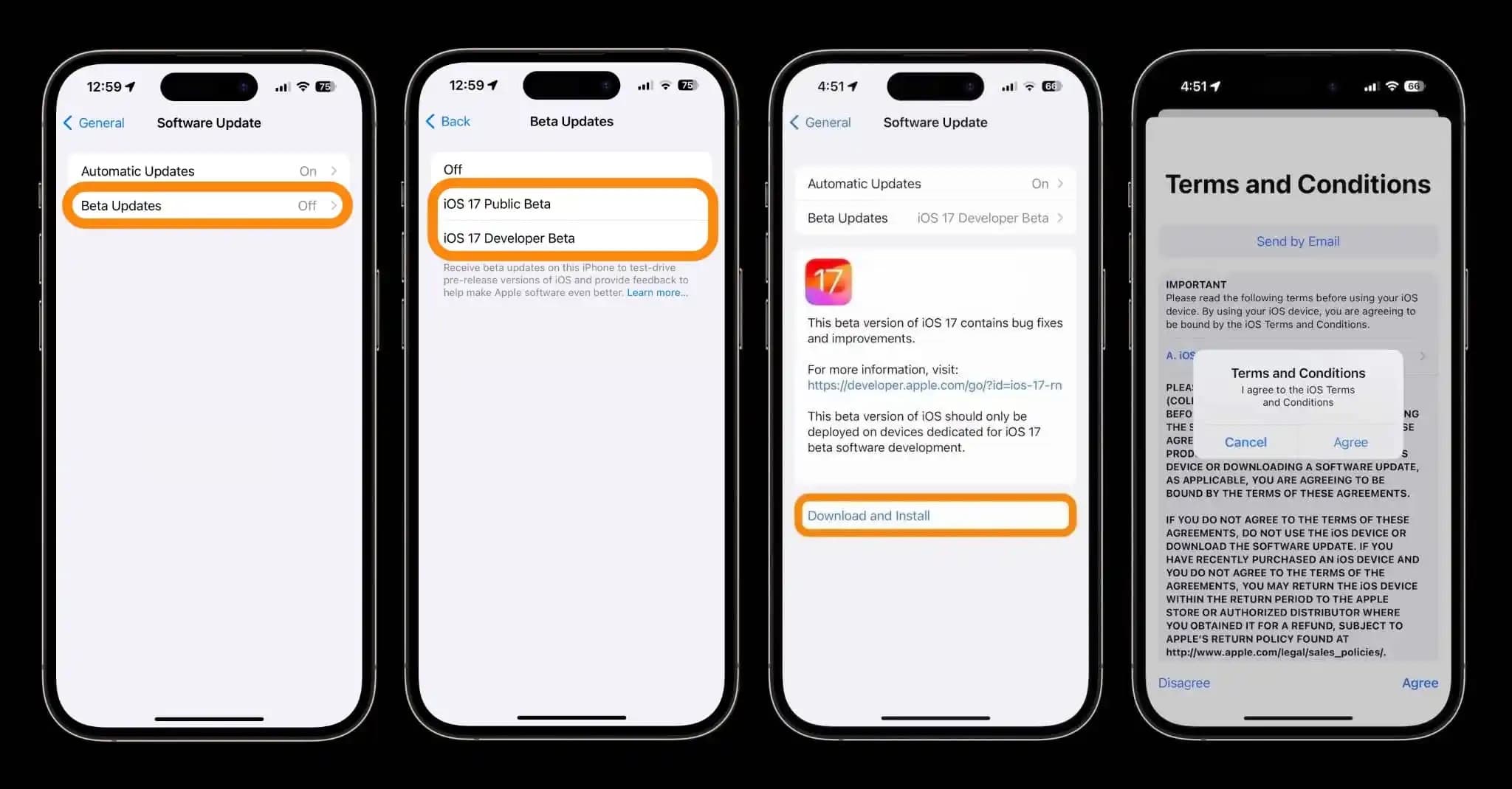
How to install iOS 17.5 beta – public<

  1. Make a fresh backup< of your iPhone or iPad<
  2. You may need to sign in with your Apple ID at beta.apple.com< if you haven’t before<
  3. Launch the Settings app<< on your iPhone or iPad (running at least iOS 16.4)<
  4. Tap General<< > Software Update<<<
  5. Choose the Beta Updates<< button<
  6. Now tap iOS 17.5 Public Beta<<<
  7. If you need to change your Apple ID associated with the beta, you can tap that at the bottom<
  8. Choose Back<< when done<
  9. Look for iOS 17.5 Public Beta<< to appear and choose Download and Install<<<
  10. <

How to install iOS 17.5 beta – developer<

  1. A paid Apple Developer account is no longer needed – but you may need to sign in with your Apple ID at developer.apple.com< if you haven’t before<
  2. Make a fresh backup< of your iPhone or iPad<
  3. Launch the Settings app<< on your iPhone or iPad (running at least iOS 16.4)<
  4. Tap General<< > Software Update<<.<
  5. Choose the Beta Updates<< button<
  6. Now, choose iOS 17.5 Developer Beta<<<
  7. If you need to change your Apple ID associated with the beta, you can tap that at the bottom<
  8. Choose Back<< when done<
  9. Look for iOS 17.5 Developer Beta<< to appear, choose Download and Install<<<
  10. <

If you’re not seeing the option to turn on beta updates or iOS 17.5 appear:<

  • Try quitting and relaunching the Settings app<
  • Sign in with your Apple ID at developer.apple.com< for free, then try the above steps again<
  • <

install iOS 17.5 beta walkthrough<

Read more 9to5Mac tutorials:<<<

9to5Mac is supported by Incogni<<: Here’s how to finally stop infuriating spam calls on your iPhone – try Incogni<, a personal data removal solution that secures your personal information. Learn more here.<<<

FTC: We use income earning auto affiliate links.< More.<<

<

<


Source link <<

Disclaimer

We strive to uphold the highest ethical standards in all of our reporting and coverage. We StartupNews.fyi want to be transparent with our readers about any potential conflicts of interest that may arise in our work. It’s possible that some of the investors we feature may have connections to other businesses, including competitors or companies we write about. However, we want to assure our readers that this will not have any impact on the integrity or impartiality of our reporting. We are committed to delivering accurate, unbiased news and information to our audience, and we will continue to uphold our ethics and principles in all of our work. Thank you for your trust and support.

Popular

More Like this

Install iOS 17.5 beta: How-to


9to5Mac is supported by Incogni<<: Here’s how to finally stop infuriating spam calls on your iPhone – try Incogni<, a personal data removal solution that secures your personal information. Learn more here<.<<

Interested to check out the latest iOS features early? The iOS 17.5 beta< is available for free and comes with some design changes, possible anti-stalking features<, an update for EU users, and more. Here’s how to install iOS 17.5 beta on your iPhone.<

Following iOS 17.4 which arrived with support for third-party app stores< in the EU, iMessage quantum security<new emoji<, and more, the iOS 17.5 beta is available for both developers and public beta testers.<

The iOS 17.5 beta is a more minor update than recent releases but comes with some UI changes for the Books app, iOS settings, and the Podcasts widget, may soon include new anti-stalking features, and supports for web distribution of apps in the EU.<

Check out everything new with iOS 17.5 in our full post:<

How to install iOS 17.5 beta – public<

  1. Make a fresh backup< of your iPhone or iPad<
  2. You may need to sign in with your Apple ID at beta.apple.com< if you haven’t before<
  3. Launch the Settings app<< on your iPhone or iPad (running at least iOS 16.4)<
  4. Tap General<< > Software Update<<<
  5. Choose the Beta Updates<< button<
  6. Now tap iOS 17.5 Public Beta<<<
  7. If you need to change your Apple ID associated with the beta, you can tap that at the bottom<
  8. Choose Back<< when done<
  9. Look for iOS 17.5 Public Beta<< to appear and choose Download and Install<<<
  10. <

How to install iOS 17.5 beta – developer<

  1. A paid Apple Developer account is no longer needed – but you may need to sign in with your Apple ID at developer.apple.com< if you haven’t before<
  2. Make a fresh backup< of your iPhone or iPad<
  3. Launch the Settings app<< on your iPhone or iPad (running at least iOS 16.4)<
  4. Tap General<< > Software Update<<.<
  5. Choose the Beta Updates<< button<
  6. Now, choose iOS 17.5 Developer Beta<<<
  7. If you need to change your Apple ID associated with the beta, you can tap that at the bottom<
  8. Choose Back<< when done<
  9. Look for iOS 17.5 Developer Beta<< to appear, choose Download and Install<<<
  10. <

If you’re not seeing the option to turn on beta updates or iOS 17.5 appear:<

  • Try quitting and relaunching the Settings app<
  • Sign in with your Apple ID at developer.apple.com< for free, then try the above steps again<
  • <

install iOS 17.5 beta walkthrough<

Read more 9to5Mac tutorials:<<<

9to5Mac is supported by Incogni<<: Here’s how to finally stop infuriating spam calls on your iPhone – try Incogni<, a personal data removal solution that secures your personal information. Learn more here.<<<

FTC: We use income earning auto affiliate links.< More.<<

<

<


Source link <<

Disclaimer

We strive to uphold the highest ethical standards in all of our reporting and coverage. We StartupNews.fyi want to be transparent with our readers about any potential conflicts of interest that may arise in our work. It’s possible that some of the investors we feature may have connections to other businesses, including competitors or companies we write about. However, we want to assure our readers that this will not have any impact on the integrity or impartiality of our reporting. We are committed to delivering accurate, unbiased news and information to our audience, and we will continue to uphold our ethics and principles in all of our work. Thank you for your trust and support.

Website Upgradation is going on for any glitch kindly connect at office@startupnews.fyi

More like this

JPMorgan Questions Ethereum’s Growth Path After Latest Network Upgrade

JPMorgan< says Ethereum’s most recent network upgrade improves technical...

Malaysia lifts ban on Grok after taking X at...

After being one of the first countries in the...

How Apple’s Revamped AI Could Center on Wearables

Every tech company seems to be flirting with wearable...

Popular

iptv best provider iptv best provider iptv best provider iptv best provider iptv best provider iptv best provider iptv best provider iptv best provider iptv best provider iptv best provider iptv best provider iptv best provider iptv best provider iptv best provider iptv best provider iptv best provider iptv best provider iptv best provider iptv best provider iptv best provider iptv best provider iptv best provider iptv best provider iptv best provider iptv best provider iptv best provider iptv best provider iptv best provider iptv best provider iptv best provider iptv best provider iptv best provider iptv best provider iptv best provider iptv best provider iptv best provider iptv best provider iptv best provider iptv best provider iptv best provider iptv best provider iptv best provider iptv best provider iptv best provider iptv best provider iptv best provider iptv best provider iptv best provider iptv best provider iptv best provider iptv best provider iptv best provider iptv best provider iptv best provider iptv best provider iptv best provider iptv best provider iptv best provider iptv best provider iptv best provider iptv best provider iptv best provider iptv best provider iptv best provider iptv best provider iptv best provider iptv best provider iptv best provider iptv best provider iptv best provider iptv best provider iptv best provider iptv best provider iptv best provider iptv best provider iptv best provider iptv best provider iptv best provider iptv best provider iptv best provider iptv best provider iptv best provider iptv best provider iptv best provider iptv best provider iptv best provider iptv best provider iptv best provider iptv best provider iptv best provider iptv best provider iptv best provider iptv best provider iptv best provider iptv best provider iptv best provider iptv best provider iptv best provider iptv best provider iptv best provider iptv best provider iptv best provider iptv best provider iptv best provider iptv best provider iptv best provider iptv best provider iptv best provider iptv best provider iptv best provider iptv best provider iptv best provider iptv best provider iptv best provider iptv best provider iptv best provider iptv best provider iptv best provider iptv best provider iptv best provider iptv best provider iptv best provider iptv best provider iptv best provider iptv best provider iptv best provider iptv best provider iptv best provider iptv best provider iptv best provider iptv best provider iptv best provider iptv best provider iptv best provider iptv best provider iptv best provider iptv best provider iptv best provider iptv best provider iptv best provider iptv best provider iptv best provider iptv best provider iptv best provider iptv best provider iptv best provider iptv best provider iptv best provider iptv best provider iptv best provider iptv best provider iptv best provider iptv best provider iptv best provider iptv best provider iptv best provider iptv best provider iptv best provider iptv best provider iptv best provider iptv best provider iptv best provider iptv best provider iptv best provider iptv best provider iptv best provider iptv best provider iptv best provider iptv best provider iptv best provider iptv best provider iptv best provider iptv best provider iptv best provider iptv best provider iptv best provider iptv best provider iptv best provider iptv best provider iptv best provider iptv best provider iptv best provider iptv best provider iptv best provider iptv best provider iptv best provider iptv best provider iptv best provider iptv best provider iptv best provider iptv best provider iptv best provider iptv best provider iptv best provider iptv best provider iptv best provider iptv best provider iptv best provider iptv best provider